Lifecycle Policies in S3 Buckets

Introduction
In the previous article of this series, I introduced you to storage classes in S3 buckets and how choosing the right class can help you depending on your needs. In this article, we will be talking about a topic closely related to storage classes: S3 lifecycle rules, which, among other things, allow you to automatically move objects from one class to another. Let’s see what we can do with this S3 feature.
Utility of Lifecycle Rules
Lifecycle rules allow us to perform actions on our objects stored in S3 automatically. They are divided into two types of actions:
- Transition actions:
- They allow us to automatically move our objects from one class to another. For example, if we want to move our objects from the
S3 Standardclass toS3 Glacierafter 6 months from when the object was created in the bucket, we can do so with these actions.
- They allow us to automatically move our objects from one class to another. For example, if we want to move our objects from the
- Expiration actions:
- They allow us to delete objects from our bucket after a certain period.
- They can be used to delete versions of our objects, only if versioning is enabled in our bucket.
- They can be used to delete incomplete Multi-Part uploads.
It’s important to note that rules can be created for specific prefixes in our bucket. For example, if we want a rule to apply only to objects organized under the images/ prefix, we can specify it. We can also apply rules to objects with certain tags.
Lifecycle rules are not affected by
bucket policies; that is, even if abucket policydenies all actions for all users in a bucket, lifecycle rules will function normally.
Supported Lifecycle Transitions
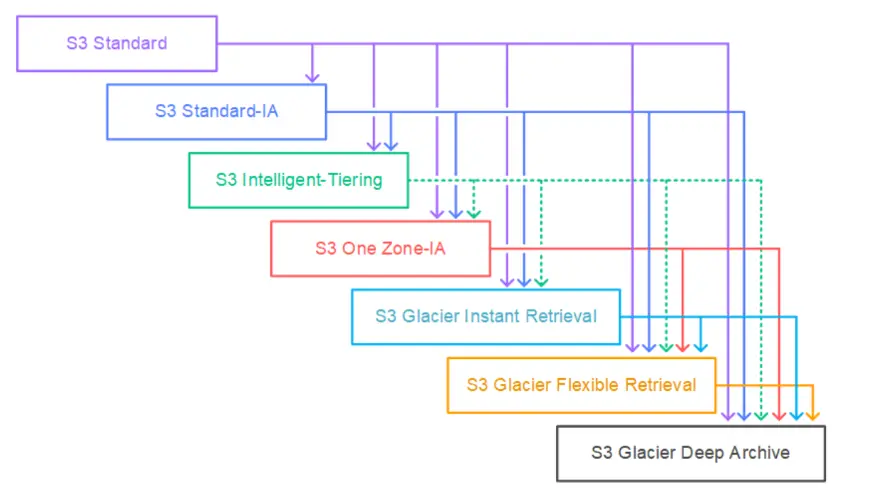
In the image above, we can see the different transitions between various storage classes using S3 lifecycle rules.
It’s important to note that for buckets with versioning enabled, objects whose replication status is
Pendingcannot be transitioned.
Limitations for Transition Actions
Objects smaller than 128KB do not transition by default to any class
This happens because a transition request fee is applied each time a transition from one class to another occurs, and for small objects, the cost of transition is greater than the storage savings achieved by moving to another class.
If you wish to apply transitions to objects smaller than 128KB, you can apply an
object size filterthat specifies a custom minimum size(ObjectSizeGreaterThan).
Objects must be stored for a minimum of 30 days before transitioning to certain classes
If you want to transition your objects to S3 Standard-Infrequent Access or S3 One Zone-Infrequent Access, they must be stored in the bucket for at least 30 days. AWS does not support this transition in the first 30 days because new objects are accessed more frequently than is feasible for moving them to one of these two classes.
Charges apply for transitioning objects before their minimum storage duration
Some classes have a minimum storage duration (check here). If you transition an object from one class to another and it has not yet met that minimum storage duration, those charges will apply. For example, if your object has a class whose minimum storage duration is 30 days, and after 15 days it transitions to another class, then charges corresponding to the remaining 15 days will be applied.
Considerations for Expiration Actions
When an object reaches the end of its lifespan based on an expiration action, S3 takes an Expiration action based on the bucket’s Versioning state (a topic we will cover in upcoming articles):
- Non-versioned bucket: Amazon S3 adds the object to a queue for asynchronous removal, permanently deleting the object.
- Versioned bucket: If the current object is not a
delete marker, S3 marks it as adelete markerwith a unique version ID. - Versioning-suspended bucket: S3 creates a
delete markerwith null as the version ID. Thisdelete markerreplaces any version of the object with a null version ID, effectively deleting the object.
For buckets with versioning enabled or suspended, keep the following in mind:
- Object expiration only applies to the current version of an object.
- S3 does not take any action if there are one or more versions of the object and the
delete markeris the current version.
If you don’t understand S3 bucket versioning, we will be covering this topic in the next article.
Practical Applications
Your application stores a file in an S3 bucket every day to maintain the state of an entity in your application, and you know that after three months these files will hardly be accessed again, but even so, they must be accessed instantly. Additionally, these files only need to be stored for one year. In this case, you can design the solution as follows:
- Objects are stored in
S3 Standardand, using a transition rule, are moved to theS3 Standard-Infrequent Accessclass. - Using an expiration rule, objects expire after being stored in the bucket for one year.
- Objects are stored in
Your application generates thumbnails of each user’s profile images. These images can be easily reproduced and only need to be kept for 60 days. Profile images must be retrieved immediately for 60 days, but after 60 days, the user can wait up to 6 hours. In this case, you can design this solution as follows:
- Store the thumbnails in
S3 One Zone-Infrequent Accesswith an expiration rule to delete them after 60 days. - Store the images in
S3 Standardand, with a transition rule, move them toS3 Glacierafter 60 days.
- Store the thumbnails in
See You Soon
This is all for now regarding the third article in this series where I will be providing you with a complete guide on S3 buckets. In the next article, we will be talking about versioning in S3 buckets. See you soon.
Related Content
- S3 Storage Classes
- What Are S3 Buckets and What Are They For?
- Practical Application of CloudFront Functions
- Deploying Our Blog in a Serverless Way
- My AWS Journey